Troubleshooting single sign-on setup
When configuring SSO, you may encounter error messages if anything you have entered needs to be corrected. Error messages display in the following format:
{

“statusCode”: 401,

“error”: “Unauthorized”,

“message”: “Error parsing meta data from client’s server.”,

“errorCode”: 2,

“code”: 2,

“status”: “fail

}
Most of these messages originate from data entry errors or omissions within LCD, but it is possible that errors may need to be resolved in components separate from LCD, such as your enterprise SSO application (Azure, Okta, etc.).
| Message | Cause |
|---|---|
| CustomerKey is required and must be 20 alphanumeric characters. | Check in the SAML configuration and verify that the Reply URL contains a correctly formatted customer account key. |
| Customer Not Found | Check in the SAML configuration and verify that the Reply URL contains a valid customer account key. |
| Error parsing meta data from client’s server. | Check that the metadata URL is valid and successfully downloads using a web browser. |
| SAML claim data not base64 encoded. | Check your identity provider’s signature policy and set Always Sign Assertion to True. |
| Claim data XML malformed. | The specified may load, but its content is not metadata. If you encounter the above issue, check that the metadata URL is valid and successfully downloads using a web browser. |
| SAML verification failed. Invalid audience. | This error occurs when the identifier (identity ID, entity ID, audience URI, etc.) setting used for your organization’s identity provider does not match the value defined in LCD. When this happens, LCD shows the correct identifier to be used to resolve the issue. Update the LCD form with the correct identifier provided. |
| Email Attribute missing in response. | The SAML response does not include the email attribute. |
| Name Attribute missing in response. | The SAML response does not include the name attribute. |
Error messages from outside LCD
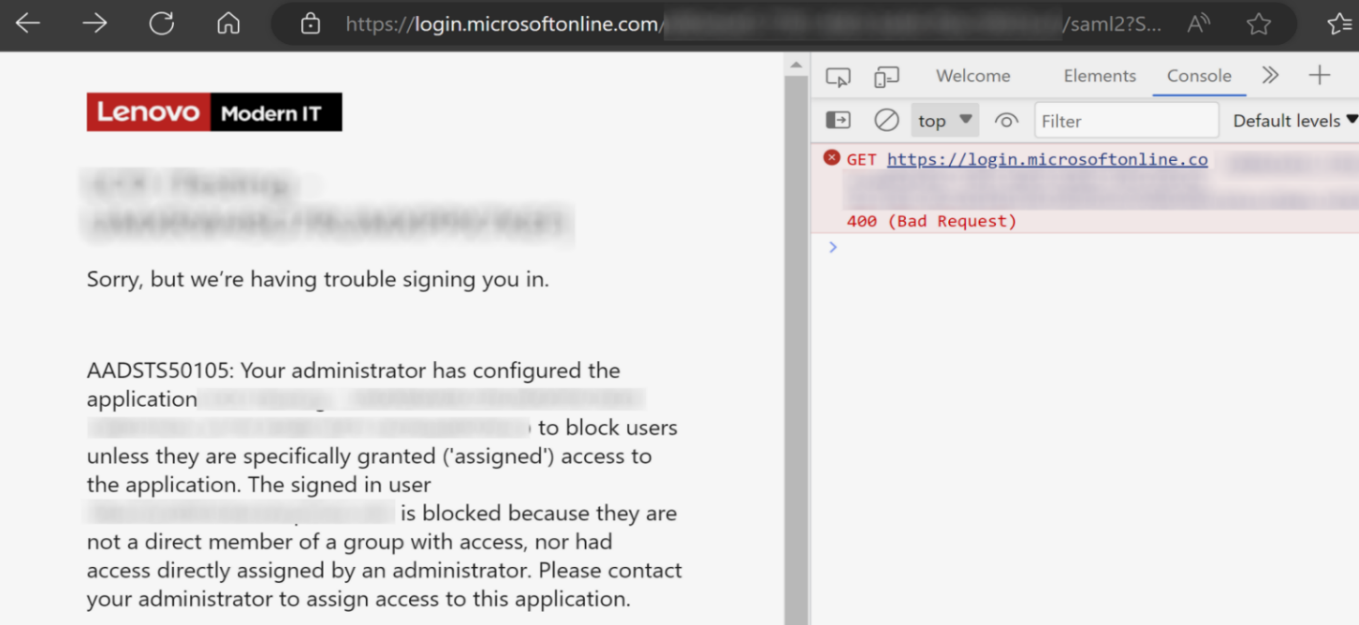
Access denied on login: Bad Request
Check that the user is granted access to your enterprise SSO application. The following image shows this error occurring because the user has not been granted access to the organization’s Microsoft SSO management application.