June 13, 2026 release
Improvements included in the LCD 3.3 release
- Preparing for the Windows UEFI 2023 CA migration
- Using another device to sign in to LCD
- Support for utilizing the BIOS proxy configuration settings
Preparing for the Windows UEFI 2023 CA Migration
With the migration of the Microsoft Windows Production PCA 2011 to Windows UEFI 2023 CA, we want to ensure your devices will be supported by LCD after the LCD 3.3 launch. The following articles provided by Microsoft and Lenovo give detailed explanations of the change and how to prepare your devices. For support on the remediation process, work with Microsoft or Lenovo Support directly.
Lenovo articles:
Lenovo Secure Boot Certificate Expiration Guide (2011 - 2023) - Note: This article contains important hardware support information including supported BIOS versions and remediation steps.
Updating Windows Boot Manager and WinPE with the Windows UEFI CA 2023 Certificate
MS KB articles:
Recommended actions
To ensure uninterrupted LCD service, the following actions are strongly recommended prior to the LCD 3.3 release in May:
Update your BIOS to the latest version.
Follow the Microsoft process for installing the Windows UEFI 2023 CA into the Secure Boot Active DB. Alternatively, if you need to perform a recovery and have the latest BIOS, you can then reset the Secure Boot keys in BIOS setup to apply the Windows UEFI CA 2023 certificate.
Note that modification of the Secure Boot keys may invoke BitLocker recovery. Please take the appropriate precautions.
LCD 3.3 pre- and post-launch support
USB media created pre-LCD 3.3 is signed with the 2011 certificate by default. LCD 3.3 and future versions will use the 2023 certificate by default.
For definitions of the terms used in this table, refer to the glossary that follows the table.
| Hardware state | LCD support pre-LCD 3.3 launch | Support post-LCD 3.3 launch |
|---|---|---|
| • Secure Boot is enabled, • the Secure Boot DB in the BIOS contains the 2011 certificate that is active, AND • the 2023 certificate is active | Scenario is supported by LCD, no action required. | Scenario is supported by LCD, no action required. |
| • Secure Boot is enabled, • the Secure Boot DB in the BIOS contains the 2011 certificate that is expired, AND • the 2023 certificate is active | Scenario is supported by LCD, no action required. | Scenario is supported by LCD, no action required. |
| • Secure Boot is enabled, • the Secure Boot DB in the BIOS contains the 2011 cert that is revoked, AND • the 2023 cert is active | LCD does not boot by default. Lenovo Cloud Boot is not supported. USB will require a manual adjustment. * | Scenario is supported by LCD, no action required. |
| • Secure Boot is enabled, AND • the Secure Boot DB in the BIOS contains only the 2011 certificate that is active | Scenario is supported by LCD, no action required. | LCD does not boot by default. Lenovo Cloud Boot is not supported. USB will require a manual adjustment.* |
| • Secure Boot is enabled, AND • the Secure Boot DB in the BIOS contains only the 2011 certificate that is expired | Not applicable | LCD does not boot by default. Lenovo Cloud Boot is not supported. USB will require a manual adjustment.* |
| • Secure Boot is disabled • Lenovo Cloud Boot is not supported | Scenario is supported by LCD, no action required. | Scenario is supported by LCD, no action required. |
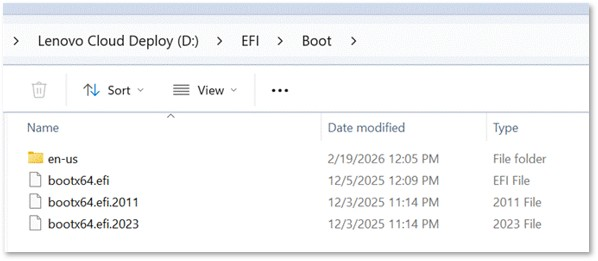
* Current and future LCD media contain boot files signed with the 2011 and 2023 certificates. If you require a specific version of the boot file, you can manually copy the appropriate version over the default EFI file, which is located as shown in the following image.
Glossary of terms in the preceding table
Certificate names
2011 certificate: Microsoft Windows Production PCA 2011
2023 certificate: Windows UEFI CA 2023
Certificate states
Default: the certificate is installed in Default Secure Boot DB and the current date is before the certificate expiration date.
Active: the certificate is installed in the Active Secure Boot DB and the current date is before the certificate expiration date.
Expired: the certificate is installed in the Active Secure Boot DB and the current date is after the certificate expiration date.
Revoked: the certificate is installed in the Active Secure Boot DB and the certificate is present in the Secure Boot DBX.
Updates to the LCD Client
Using another device to sign in to LCD
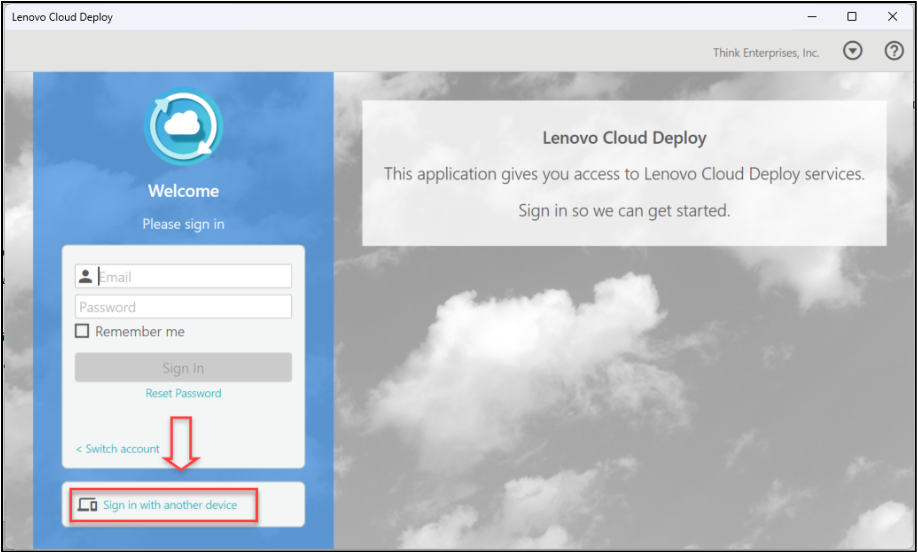
For enhanced authentication, LCD 3.3.0 provides the ability to sign in to the application on a secondary device. This feature enables signing in using QR codes for camera-enabled secondary devices, or with a sign-in link if you prefer not to use the QR code.
The new option is available when signing in:
You can then either scan the QR code or click the link and enter the code.
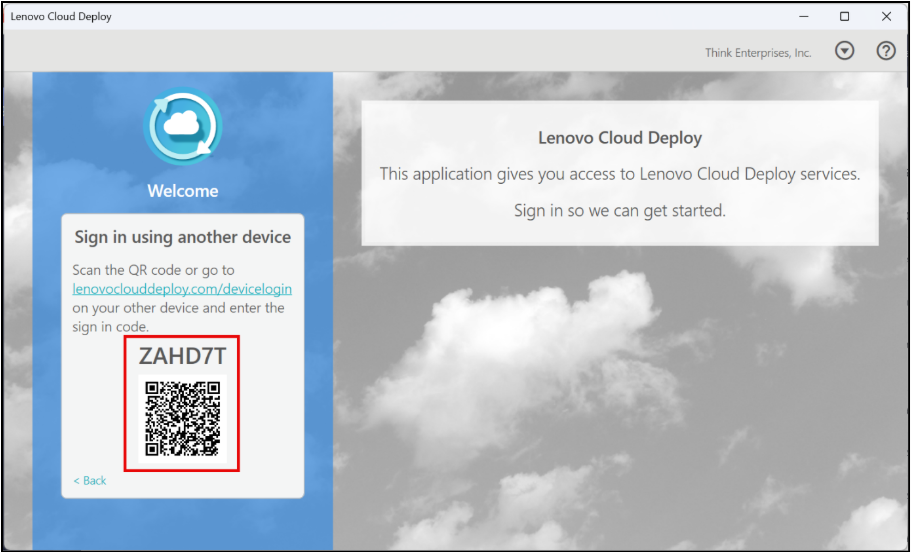
The last step is to sign into LCD with your credentials.
For full details, see Sign in to LCD with another device .
Support for Windows UEFI 2023 CA
To prepare for the upcoming certificate expiration due to the migration of the Microsoft Windows Production PCA 2011 to Windows UEFI 2023 CA, LCD 3.3.0 will use the 2023 certificate by default.
We want to ensure that all devices are supported by LCD after the LCD 3.3.0 launch. The following articles provided by Lenovo and Microsoft give detailed explanations of the change and how to prepare your devices. For support on the remediation process, work with Microsoft or Lenovo Support directly.
Lenovo articles:
Lenovo Secure Boot Certificate Expiration Guide (2011 - 2023) - Note: This article contains important hardware support information including supported BIOS versions and remediation steps.
Updating Windows Boot Manager and WinPE with the Windows UEFI CA 2023 Certificate
MS KB articles:
Support for utilizing the BIOS proxy configuration settings
Lenovo product BIOS are introducing a new feature to provide static proxy server configuration. LCD 3.3.0 has been updated to apply this setting when you deploy using Lenovo Cloud Boot.
For USB media, the existing proxy behavior has not been changed.
Updates to the LCD Website
No user-facing changes.
Release enhancements and fixes
NEW: Log into LCD from another device.
NEW: Boot media now requires the Microsoft Windows UEFI CA 2023 certificate to be present in Secure Boot DB in BIOS.
NEW: Lenovo Cloud Boot now applies proxy settings configured in the system BIOS.
UPDATED: Disabled the F12 debugger in the recovery environment integrated web browser to improve security.
UPDATED: Updated the Collect and save logs feature to save additional diagnostic information.