Production status
During their lifetime, deployments and provisioning kits typically transition through a series of states. The current state of a deployment or provisioning kit is known as its production status. This status affects which actions can be performed against the deployment or provisioning kit and who has permission to perform those actions.
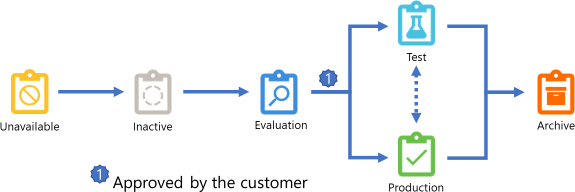
| Icon | Production Status | Description |
|---|---|---|
 | Unavailable | Deployment upload is in progress or has failed. |
 | Inactive | Visible by Lenovo Engineers only. Deployment upload is complete. Deployment is ready for production status to be changed to *Evaluation* for evaluation by the Customer. |
 | Evaluation | Customer evaluation begins. Approved Deployment is ready to be tested by Customer Test Engineers or to go into *Production*. Authorization of the target computer will not be performed. |
 | Test | Perform testing by Customer Test Engineers. For most customers, authorization of the target computer will be performed. |
 | Production | Deployment is ready for use by end users. For most customers, authorization of the target computer will be performed. |
 | Archived | Deployment is retained for auditing purposes but is unavailable to use. |