Security
Lenovo Cloud Deploy (LCD) is a high-security, efficient method for customers to send file data to Lenovo, for Lenovo to send file data to customers, and for customers to deploy or update operating systems, operating system components, and applications prepared by customers or Lenovo.
All User roles are managed on lenovoclouddeploy.com. Account Administrators can assign different roles to users for managing their authorization level. The four general categories of users are:
- Administrative roles: for users who manage their account. These roles apply to the website and affect the installed applications.
- Engineer roles: for users who interact with Lenovo to develop solutions. They are responsible for creating, managing, and deleting content.
- Testing roles: for users who test solutions developed for LCD.
- User roles: for users who use production-ready content to restore their system.
1 - Firewall requirements
LCD uses the standard HTTPS port 443 and transport layer security (TLS) version 1.2 to communicate with the cloud back-end environment. Corporate firewalls may need additional rules configured to allow communication with the LCD infrastructure.
If your firewall supports wildcards
You must whitelist the following domains:
www.lenovoclouddeploy.com: This site maintains all the customer, user, and content metadata.
lenovoclouddeploy.com: This is the URL for the API.
*.lenovoclouddeploy.com: These sites deliver the content.
*.s3-accelerate.*.amazonaws.com: These sites receive uploaded content. Use the host in the table below that matches the region for your account.
*.s3.*.amazonaws.com: These sites receive uploaded content. Use the host in the table below that matches the region for your account.
download.lenovo.com: This site supports the BIOS Lenovo Cloud boot option.
fonts.gstatic.com: This site is required for using lenovoclouddeploy.com.
*.google.com: This site provides the API for Recaptcha, a tool for verifying human users.
If your firewall does not support wildcards
Use the following values:
- www.lenovoclouddeploy.com. This site maintains all the customer, user, and content metadata.
- lenovoclouddeploy.com: This is the URL for the API.
- download.lenovo.com: This site supports the BIOS Lenovo Cloud boot option.
- diav4v6bggwod.lenovoclouddeploy.com: This site delivers the content.
- fonts.gstatic.com: This site is required for using lenovoclouddeploy.com.
Depending on your customer S3 region, its associated domain must be whitelisted to support uploading content.
| Region | Domain |
|---|
| Asia Pacific (Tokyo) | lcd-production-ap-northeast-1.s3-accelerate.amazonaws.com |
| lcd-production-ap-northeast-1.s3.amazonaws.com |
| lcd-production-ap-northeast-1.s3.ap-northeast-1.amazonaws.com |
| Asia Pacific (Seoul) | lcd-production-ap-northeast-2.s3-accelerate.amazonaws.com |
| lcd-production-ap-northeast-2.s3.amazonaws.com |
| lcd-production-ap-northeast-2.s3.ap-northeast-2.amazonaws.com |
| Asia Pacific (Mumbai) | lcd-production-ap-south-1.s3-accelerate.amazonaws.com |
| lcd-production-ap-south-1.s3.amazonaws.com |
| lcd-production-ap-south-1.s3.ap-south-1.amazonaws.com |
| Asia Pacific (Singapore) | lcd-production-ap-southeast-1.s3-accelerate.amazonaws.com |
| lcd-production-ap-southeast-1.s3.amazonaws.com |
| lcd-production-ap-southeast-1.s3.ap-southeast-1.amazonaws.com |
| Asia Pacific (Sydney) | lcd-production-ap-southeast-2.s3-accelerate.amazonaws.com |
| lcd-production-ap-southeast-2.s3.amazonaws.com |
| lcd-production-ap-southeast-2.s3.ap-southeast-2.amazonaws.com |
| Asia Pacific (Sydney) | lcd-production-ap-southeast-2.s3-accelerate.amazonaws.com |
| lcd-production-ap-southeast-2.s3.amazonaws.com |
| lcd-production-ap-southeast-2.s3.ap-southeast-2.amazonaws.com |
| Canada (Central) | lcd-production-ca-central-1.s3-accelerate.amazonaws.com |
| lcd-production-ca-central-1.s3.amazonaws.com |
| lcd-production-ca-central-1.s3.ca-central-1.amazonaws.com |
| Europe (Frankfurt) | lcd-production-eu-central-1.s3-accelerate.amazonaws.com |
| lcd-production-eu-central-1.s3.amazonaws.com |
| lcd-production-eu-central-1.s3.eu-central-1.amazonaws.com |
| Europe (Ireland) | lcd-production-eu-west-1.s3-accelerate.amazonaws.com |
| lcd-production-eu-west-1.s3.amazonaws.com |
| lcd-production-eu-west-1.s3.eu-west-1.amazonaws.com |
| Europe (London) | lcd-production-eu-west-2.s3-accelerate.amazonaws.com |
| lcd-production-eu-west-2.s3.amazonaws.com |
| lcd-production-eu-west-2.s3.eu-west-2.amazonaws.com |
| Europe (Paris) | lcd-production-eu-west-3.s3-accelerate.amazonaws.com |
| lcd-production-eu-west-3.s3.amazonaws.com |
| lcd-production-eu-west-3.s3.eu-west-3.amazonaws.com |
| South America (São Paulo) | lcd-production-sa-east-1.s3-accelerate.amazonaws.com |
| lcd-production-sa-east-1.s3.amazonaws.com |
| lcd-production-sa-east-1.s3.sa-east-1.amazonaws.com |
| US East (N. Virginia) | lcd-production-us-east-1.s3-accelerate.amazonaws.com |
| lcd-production-us-east-1.s3.amazonaws.com |
| lcd-production-us-east-1.s3.us-east-1.amazonaws.com |
| US East (Ohio) | lcd-production-us-east-2.s3-accelerate.amazonaws.com |
| lcd-production-us-east-2.s3.amazonaws.com |
| lcd-production-us-east-2.s3.us-east-2.amazonaws.com |
| US West (N. California) | lcd-production-us-west-1.s3-accelerate.amazonaws.com |
| lcd-production-us-west-1.s3.amazonaws.com |
| lcd-production-us-west-1.s3.us-west-1.amazonaws.com |
| US West (Oregon) | lcd-production-us-west-2.s3-accelerate.amazonaws.com |
| lcd-production-us-west-2.s3.amazonaws.com |
| lcd-production-us-west-2.s3.us-west-2.amazonaws.com |
If your firewall requires IP addresses
If your firewall requires specific IP addresses, reference the following AWS website maintained by Amazon. It provides instructions on how to download a JSON file containing IP ranges for AWS services: https://docs.aws.amazon.com/general/latest/gr/aws-ip-ranges.html.
- All entries matching the following region and service must be allowed. “region”: “us-east-1”, “service”: “AMAZON”
- All entries matching the following service must be allowed. “service”: “CLOUDFRONT”
Depending on your Customer S3 region, the associated service “S3” must be whitelisted to support uploading content:
| Entries | Region |
|---|
| US East (Northern Virginia) | “region”: “us-east-1”, “service”: “S3” |
| Canada (Central) | “region”: “ca-central-1”, “service”: “S3” |
| Asia Pacific (Mumbai) | “region”: “ap-south-1” “service”: “S3” |
| Asia Pacific (Sydney) | “region”: “ap-southeast-2”, “service”: “S3” |
| Asia Pacific (Tokyo) | “region”: “ap-northeast-1”, “service”: “S3” |
| EU (Frankfurt) | “region”: “eu-central-1”, “service”: “S3” |
| EU (London) | “region”: “eu-west-2”, “service”: “S3” |
| South America (São Paulo) | “region”: “sa-east-1”, “service”: “S3” |
Support for the Lenovo Cloud BIOS boot feature with this scenario is out of this website’s scope. The Akamai CDN this feature uses does not provide a public API for determining which IP address ranges must be allowed by your firewall.
2 - Proxy requirements
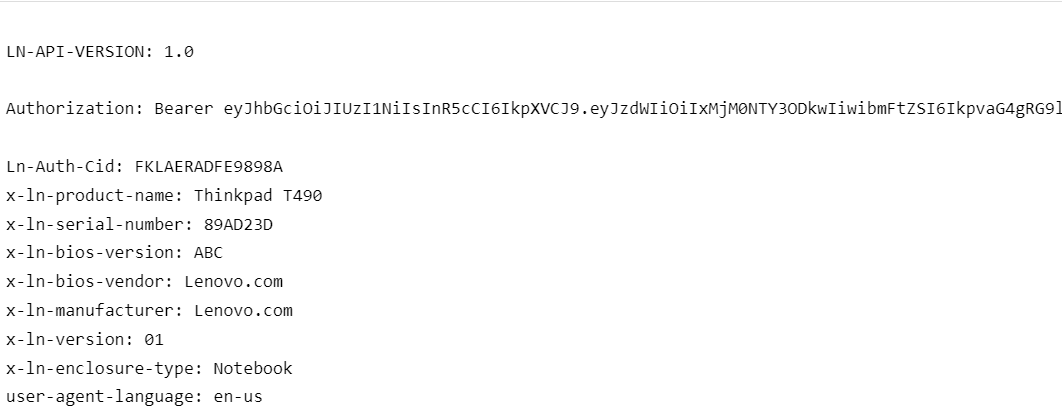
Proxy servers must support Transport Layer Security (TLS) version 1.2. The API endpoints use request headers to identify and authorize the client application.
Companies that use a proxy server may need to configure it to leave these header values intact to support LCD.
An example request header may appear as follows:
3 - Authentication
Users are individuals authorized to access the website or the LCD tool, via the LCD-API services. Users are uniquely identified by their account key and email address. Each account is assigned one or more Account Administrator users. Account Administrators can edit certain attributes of their account settings, create, and remove additional users, approve newly registered users, and manage packages uploaded to the cloud.
When a user signs into the website or the tool, a JWT is created for that session. The JWT is an encrypted, signed data block containing general information about the user, which roles have been assigned to the user, and what permissions were granted by those roles. Permissions are internal identifiers, not visible to users, that give specific authorizations for specific tasks.
There are two methods for managing user authentication:
LCD website
You can manage users, passwords and their roles on lenovoclouddeploy.com. This method is the default configuration for all accounts, as it does not have any customer infrastructure requirements. It is recommended when the customer has limited users using the service.
Users must select an adequately complex password:
At least one lowercase letter
At least one uppercase letter
At least one numeric digit
At least eight total characters
Users’ passwords reside in the MySQL database as one-way hashes using the PBKDF2 algorithm.
Users may be required to periodically change their password. The default policy requires a password change every 90 days. The Customer Administrator can modify this period.
Pros
- Simple to set up.
- No requirements on customer infrastructure.
- Imaging Technology Center (ITC) engineers can assist with user management.
Cons
- Users must maintain accounts in both lenovoclouddeploy.com and their own organization.
- There is limited control on password policies.
- Email addresses must be verified before granting access.
Single Sign On
You can manage users and passwords using your own identity provider. This method is more involved to set up as it requires you to set up a single sign-on server in your infrastructure. It is recommended for customers who have large numbers of users using the service. User roles are managed on lenovoclouddeploy.com.
See here for information on setting up Single Sign On.
Note
Once a customer is set up with single sign-on, the account cannot revert to users managed by lenovoclouddeploy.com.
Pros
- No additional user management for customers to maintain.
- Complete password policy control.
Cons
- Customer must maintain a single sign-on server.
- All accounts are initially created using lenovoclouddeploy.com for user management. The customer can transition to single sign-on at any time.
4 - Customer accounts
A customer account is a unique operating unit to use LCD services. Accounts can be a company or an operating unit within a company. Each account is assigned a unique 20-character alphanumeric key. This key must be provided for a customer to gain access to the website, the LCD-API, or the LCD tool. On Amazon, one S3 bucket folder is assigned to each customer.
An S3 bucket is a private data storage area, like a disk drive. Bucket folders are uniquely named on Amazon using the account key. Each bucket is assigned to an Amazon CloudFront distribution. Amazon CloudFront is a secure method for distributing file data throughout the world.
All bucket and CloudFront credentials are stored in a MySQL database. Secret (private) keys are encrypted in the MySQL database using the AES-256-CBC symmetric algorithm. The bucket and CloudFront credentials and secret keys are rolled weekly.
5 - Data collection and retention
Every time customer file data is created or consumed from lenovoclouddeploy.com, it is considered a transaction.
To enable and support LCD, data is collected for all user interactions.
The LCD hosting site resides in the United States. This site hosts the website, API server, and database containing all user data, transaction data, and metadata for the content stored by the service.
Usage data
The following user data is stored:
The following system data is stored for each transaction:
Usage tracking
When using the client applications to use LCD features, the following data is recorded:
These entries are archived daily after completion.
Downloads
When using LCD to access cloud content, the application records the following data:
These entries are archived after one day.
CloudTrail
AWS (Amazon Web Services) CloudTrail delivers API calls with detailed information such as:
Type
Date and time
Location
Source or origin
Outcome (exceptions, faults, and security-event information)
Affected resource (data, system, etc.)
Associated user.
AWS CloudTrail can help you identify:
The user
Event time
User’s IP address
User-provided request parameters
Response elements returned by the service
Error codes and error messages.
These logs are retained indefinitely, for intrusion detection purposes.
User logins
When a user signs into LCD via the website or client applications, LCD records the following data:
UserId
IP address
Country
These entries are purged after one day.
Database backups
The database backups containing lenovoclouddeploy.com transactions and reporting are retained for 14 days.
6 - Data security
LCD uses defense in depth. LCD has multiple layers, sitting behind a DMZ, using VPN and multifactor authentication.
- LCD servers and mechanisms are all hardened to Center for Internet Security (CIS) standards
- GEO Fencing enables access to only the appropriate users.
Data centers are located around the world, so a suitable data center can be found for optimizing upload performance whilst meeting geographical suitability.
Packages and data access
Packages are compressed data files stored in S3 bucket folders. All customer files and Lenovo-provided customer-specific files are stored in the account’s S3 Bucket folder. Certain Lenovo-provided non-customer-specific files are stored in a Lenovo common bucket folder.
LCD uploads and downloads data from the S3 bucket. For uploads, the tool seeks permission from the LCD-API. The LCD-API inspects the JWT and decides whether to give access. Amazon grants limited permission for that user to upload that package (file) for a limited period. Uploads proceed using the Amazon S3 proprietary protocol to upload the file, which is securely transferred with SSL connections.
Downloads are performed over Amazon CloudFront. To download a package, the tool seeks permission from the LCD-API. The LCD-API inspects the JWT and decides whether to give access. A temporary, signed URL is generated for the file, and the file is downloaded using HTTPS protocol. All file unpacking occurs on the target system after the download is complete.
The Amazon bucket folders are automatically configured to deny access without using the above methods.
MySQL server security features
The MySQL database servers are backed up regularly. The servers reside behind the Amazon VPC and are not directly connected to the internet. Each MySQL database has its own cryptographically secure password, and all data at rest is encrypted.
LCD monitoring
LCD’s security environment provides and executes application and network traffic monitoring, as well as intrusion detection and intrusion prevention tools, 24 hours a day, seven days a week. LCD integrates with a web application firewall (WAF) and sits within a DMZ, ensuring maximum security from incoming and outgoing traffic.
Application and network traffic monitoring, intrusion detections, and intrusion preventions are fully automated resources. This allows continuous monitoring, alerting, and blocking of all known intrusion vectors for all LCD resources.
LCD also provides human review of all security alerts to determine if additional actions must occur. The security team responds to all security alerts received during working hours. If alerts happen after hours, requiring further action, the security engineer promptly remediates the issue and provides feedback to the customer if required.
Country access control
GEO Fencing is automatically enabled to restrict which countries can access the Cloud Delivery network.
User country location is determined by client IP address lookup to a country defined by ISO 3166. Some countries cannot be identified by IP.
Data is unavailable about IP addresses for the following countries:
- Bouvet Island (BV)
- Christmas Island (CX),
- Western Sahara (EH),
- Heard Island and McDonald Islands (HM).
7 - System security
LCD comprises several elements, each with their own security considerations and features:
Amazon hosts the websites, REST data services, database servers, secure file storage, and secure file distribution. Amazon Elastic Compute Cloud (EC2) hosts websites and REST data services. The database servers run on Amazon Relational Database Service (RDS). Amazon Simple Storage Service (S3) and Amazon CloudFront handle secure file storage and distribution. All these services are tied together with Amazon Virtual Private Cloud (VPC), a private network accessible only to Lenovo Cloud Administrator Resources, while Amazon provides the public interfaces to the Internet. Amazon provides its own compliance page at https://aws.amazon.com/compliance. More detail follows about how LCD uses each of these services’ security features.
LCD uses Amazon’s Key Management Service (KMS) to roll account keys weekly. These wills are encrypted at rest using an AES 256 standard encryption algorithm. LCD allows VPN connections only to Amazon and multifactor authentication at all access points.
lenovoclouddeploy.com is the Node.js/Express website hosted on an Amazon EC2 instance. The site is based on the AngularJS framework. It is a single-page application (SPA), which minimizes traffic to and from the web server. Browser communications with the web server are exclusively HTTPS protocol, secured by a high-security (green address in the browser) SSL certificate. Access to the site is carefully controlled using a JSON Web Token (JWT). This will be further described later in this document. For more in-depth details on JWTs, see https://en.wikipedia.org/wiki/JSON_Web_Token.
LCD is a Windows® desktop application downloaded and installed from lenovoclouddeploy.com. Use the tool to upload and download files to Amazon S3, and to deploy operating systems, operating system components, and applications from files in Amazon S3. As with the website, browser communications with the REST data service are exclusively HTTPS protocol, secured by a high-security SSL certificate, with access to the service carefully controlled using a JWT. This will be further described later in this document.
Lenovo Deployment Point Master (LCD-API) is a Node.js REST data service (API) that fulfills the data query and update needs of the website and LCD, maintains the site’s master customer list, and records solution deployments by our customers’ users. Communications with the website and LCD are exclusively HTTPS protocol, secured by a high-security SSL certificate, with access carefully controlled using a JWT. This will be further described later in this document.
8 - Single sign-on (SSO)
Single sign-on configuration
Single sign-on (SSO) is a way of allowing multiple applications to use the same authentication credentials. This avoids duplicating credential entry, with the possibility of mistakes, and also means that there are fewer credentials to be lost or stolen. There is a separate page with the advantages and disadvantages of using either SSO or the LCD website for authentication.
LCD can use SSO with OpenID, SAML with Azure, SAML with Windows Server or SAML with Okta.
8.1 - Initial SAML setup
You need your LCD account key to configure SAML integration with LCD.
Note
The account key was provided by the ITC engineer when your account was first created. It should not contain any dashes or spaces. For example, 123456789ABCDEFGHIJK
Basic SAML configuration
The SAML configuration consists of an identifier and reply URL, as in the following example from Azure Active Directory.
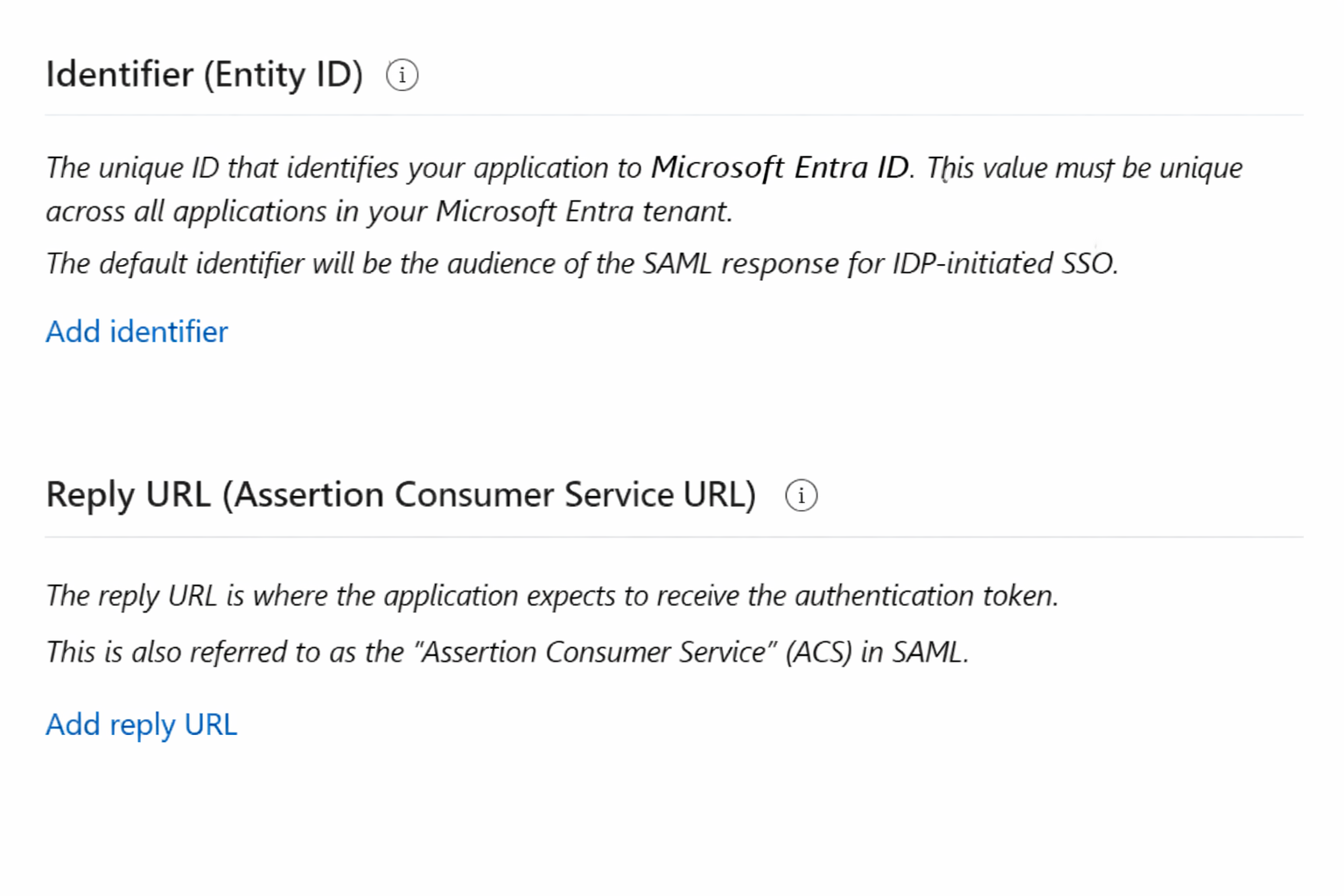
Identifier (Entity ID)
The application-defined unique identifier that is the intended audience of the SAML assertion.
For example, you can use LCD.
Audience or Reply URL
The location where the SAML assertion is sent with a HTTPS POST. This is often referred to as the SAML Assertion Consumer Service (ACS) URL for your application.
https://lenovoclouddeploy.com/api/token/ws/exchange/LCD_Account_Key/ for example,
http://lenovoclouddeploy.com/api/token/ws/exchange/123456789ABCDEFGHIJK/
Replace LCD_Account_Key with the 20-character key provided to you during onboarding. This is the same account key you can use to log into lenovoclouddeploy.com.
Note
The account key was provided by the ITC engineer when your account was first created. It should not contain any dashes or spaces. For example, 123456789ABCDEFGHIJK
Attributes and claims
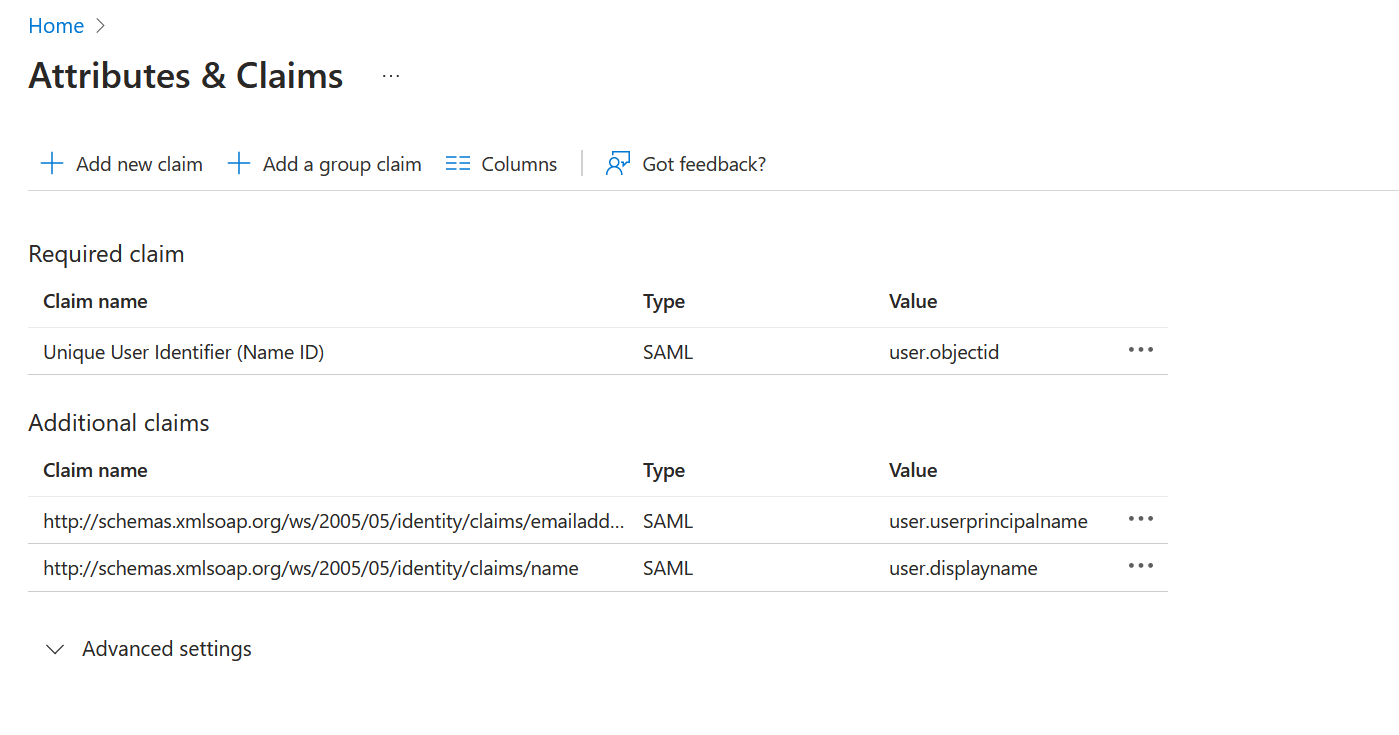
The Name ID must uniquely identify the user. For example, in Azure AD this could be their user.objectid.
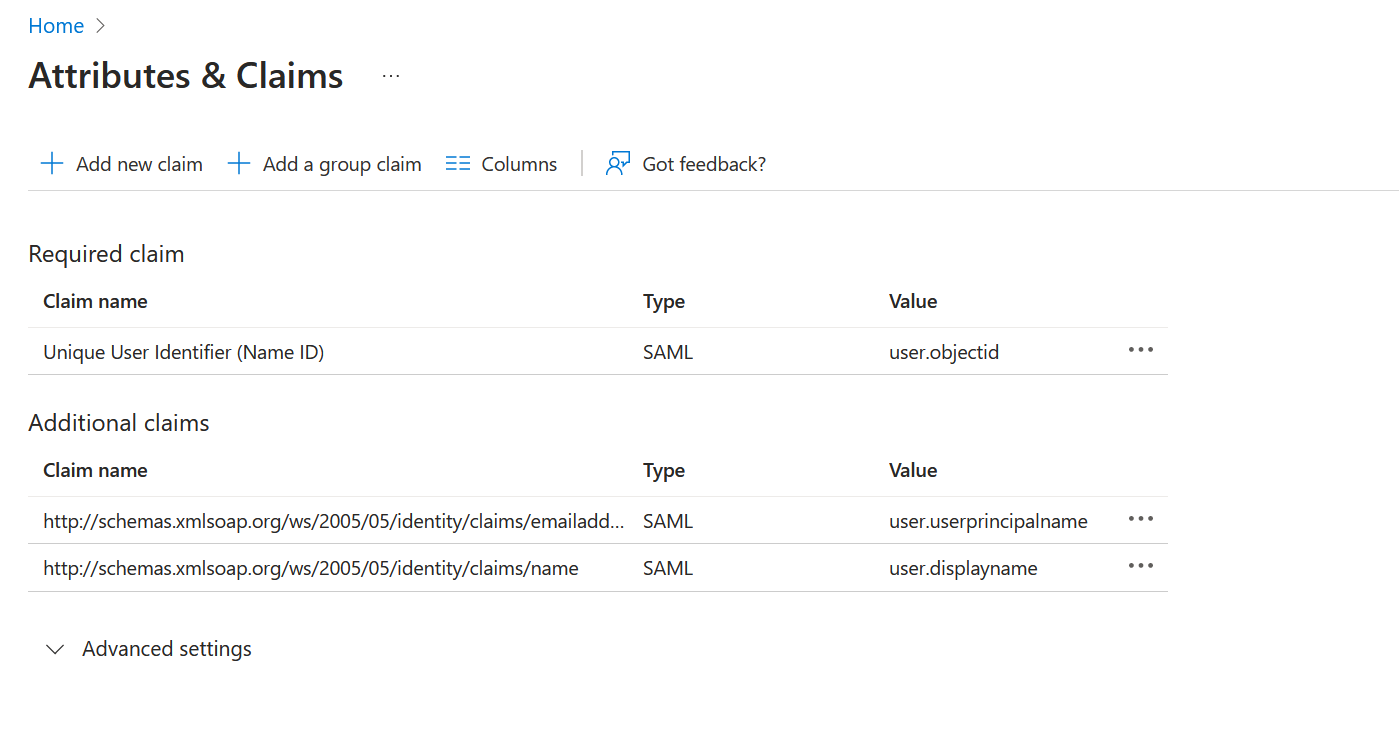
In addition to the SAML 2.0 protocol’s standard fields, LCD integration requires the following fields:
| Name | Description |
|---|
| name | The displayed full name of the user. |
| emailaddress | The email address of the user. |
The name and email fields map to LCD’s user profile fields.
SAML integration with LCD
Once everything is configured in your identity provider, the following three things are needed to complete the LCD integration and must be provided to your LCD technical contact.
Identifier (Entity ID)
Integration endpoint
Metadata endpoint
Identifier (Entity ID)
The application-defined unique identifier used to set up the SAML basic configuration.
Integration endpoint
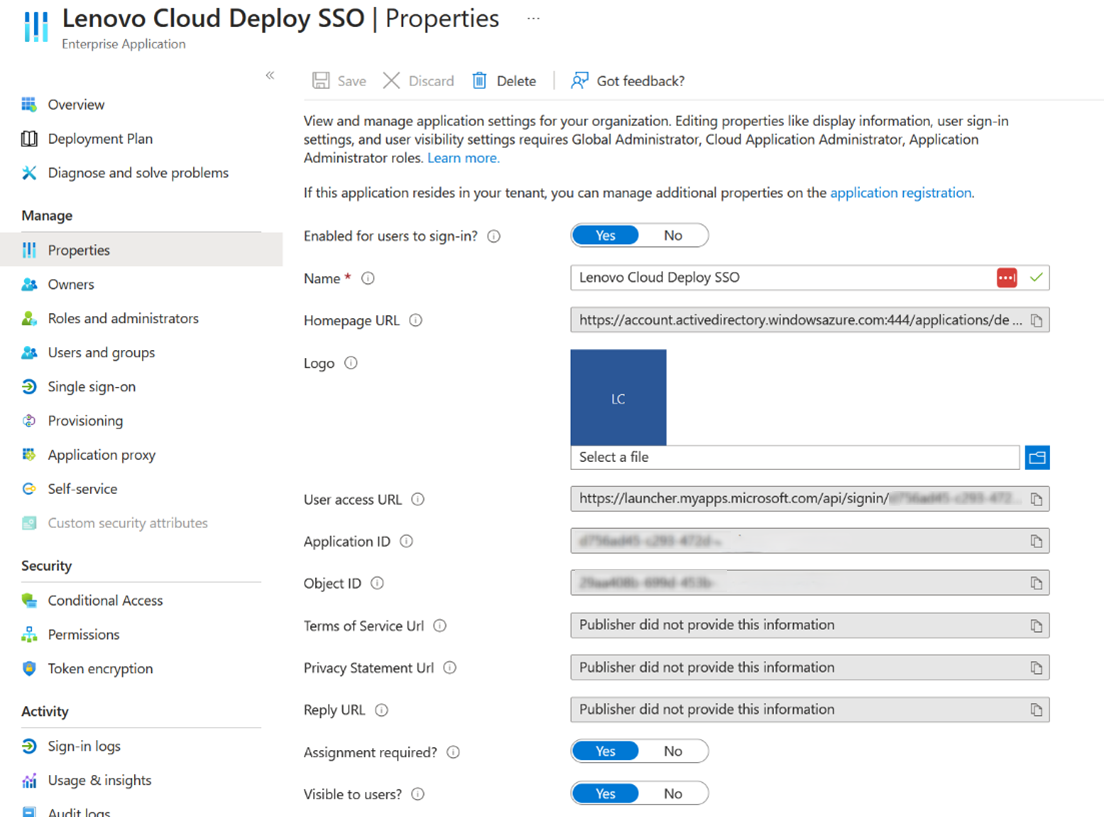
The URL where LCD redirects the client to initiate the authentication process. The endpoint redirects to the Reply URL when a user signs in. In Azure, this is the User access URL.
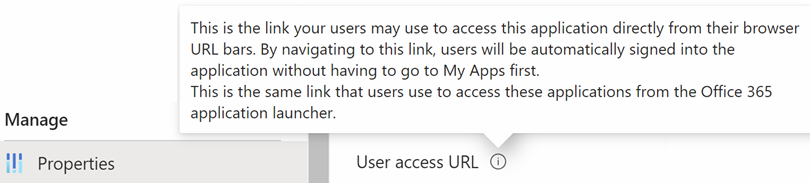
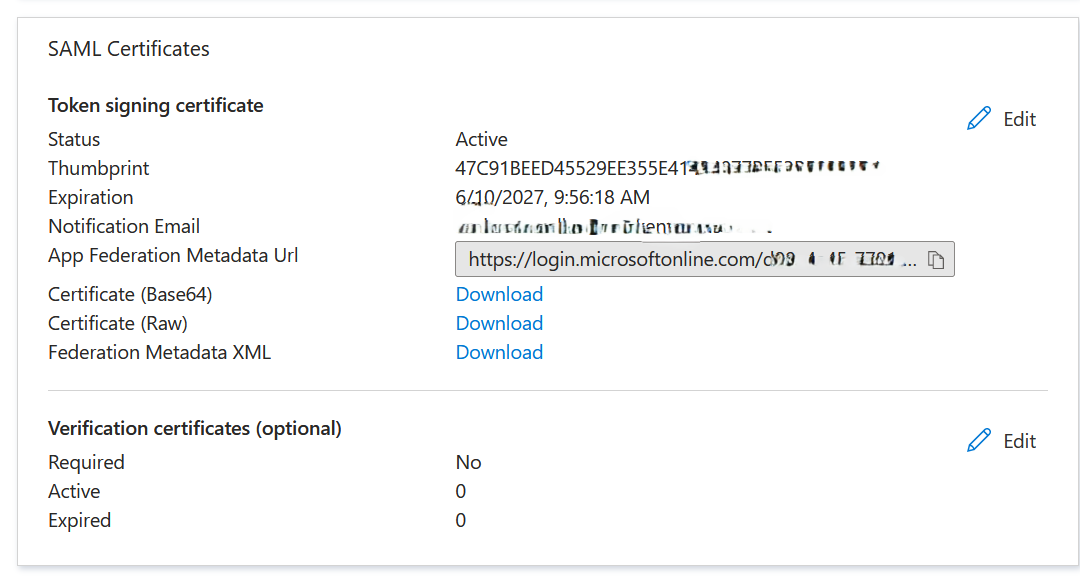
The identity provider’s metadata URL for your application.
Notes
- Have the ID Provider sign the SAML response XML message at the assertion, not the top level SAML response element of the message.
- Build SAML Claim base64 encoded with NameID, name, and emailaddress.
Next
You can now continue with the relevant setup:
8.2 - SAML setup for Azure
See the SAML overview before beginning these instructions.
This section provides an example setting up Microsoft Azure as an LCD identity provider.
Log in into https://portal.azure.com.
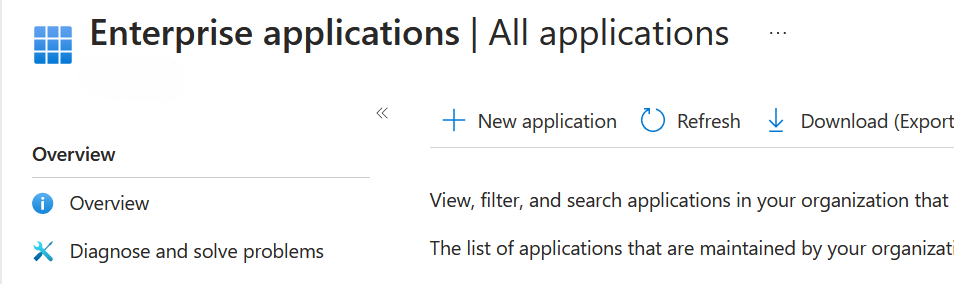
In the Azure Active Directory, under Manage, select Enterprise applications.
Click New application.
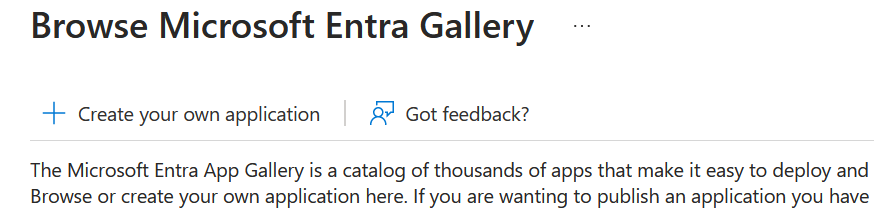
Click Create your own application.
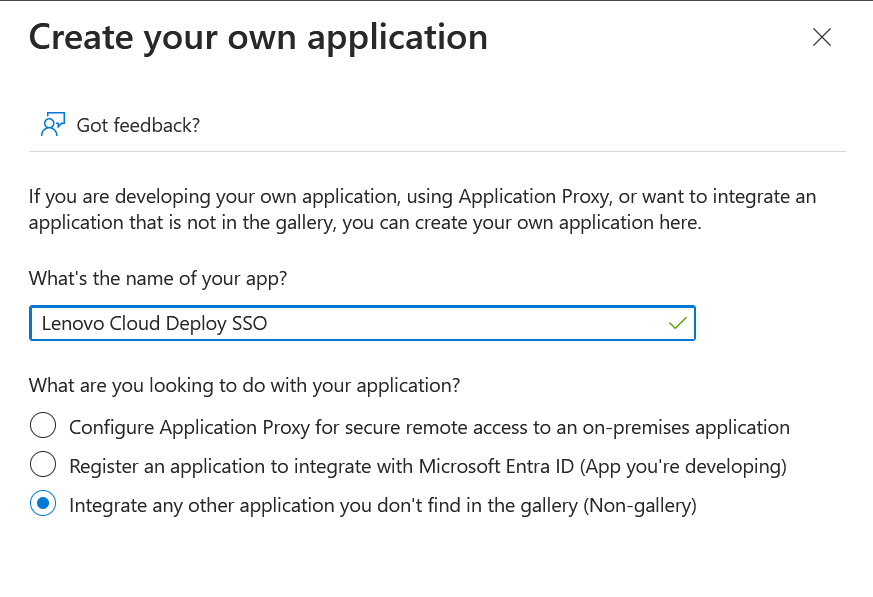
Enter the name for your application and select Integrate any other application…
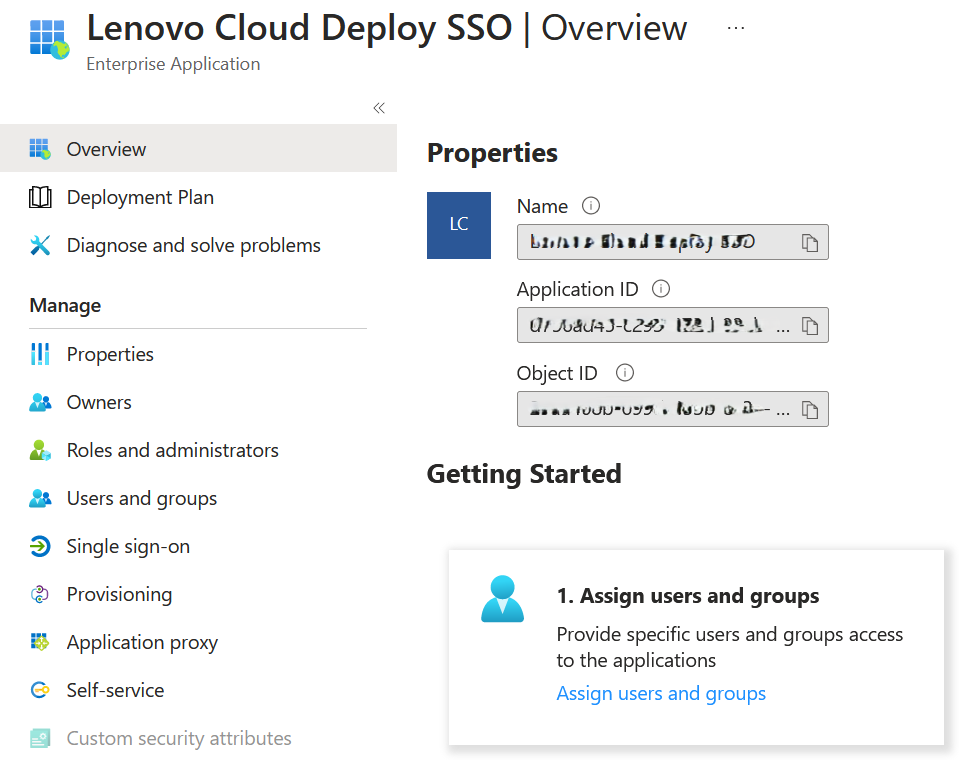
In the newly created application, under Manage, select Single sign-on.
Select Method: Click the SAML tile.
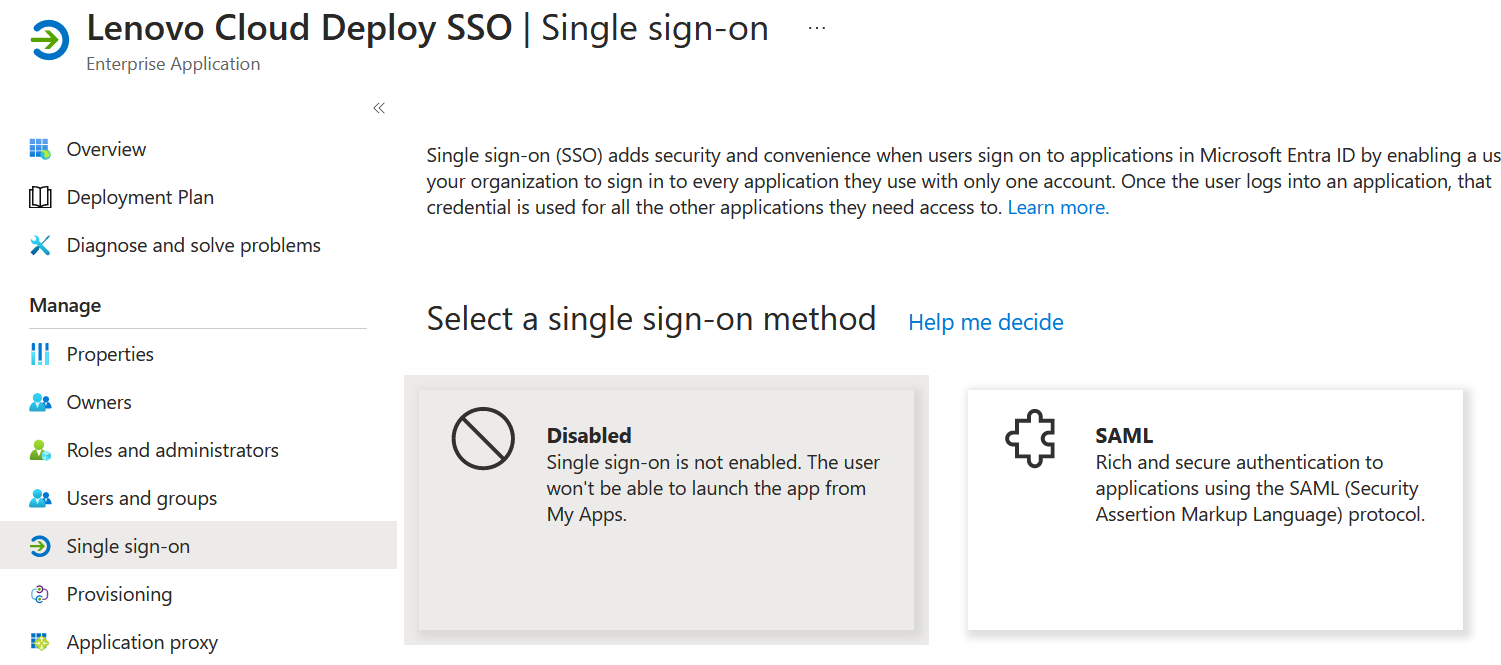
Basic SAML Configuration: Click Edit.
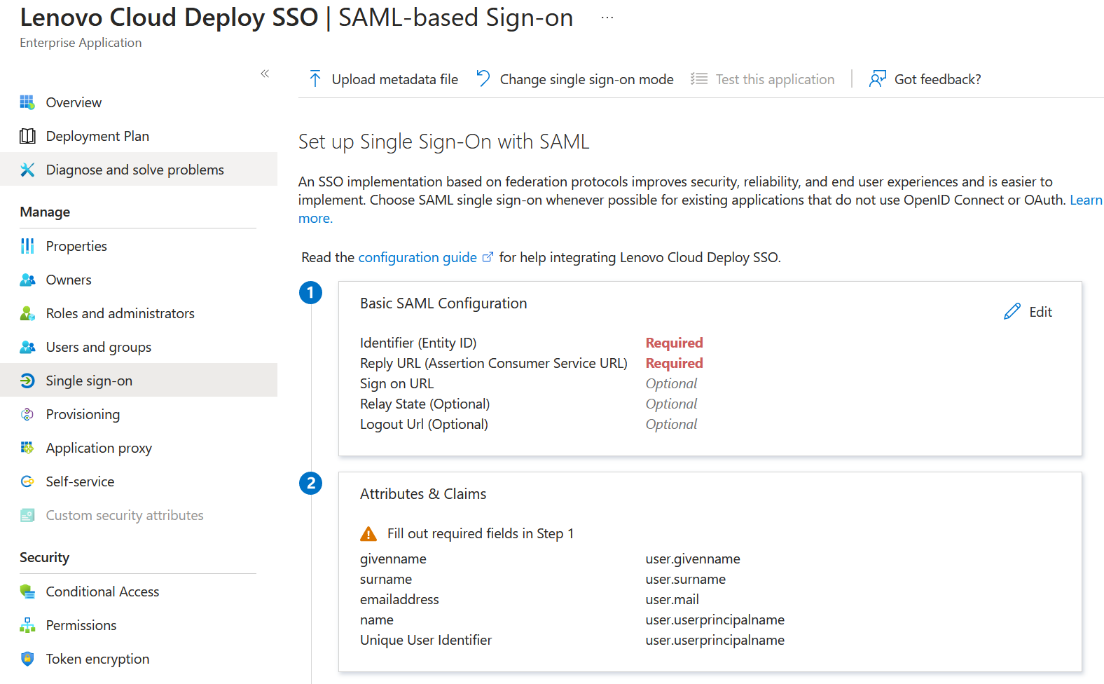
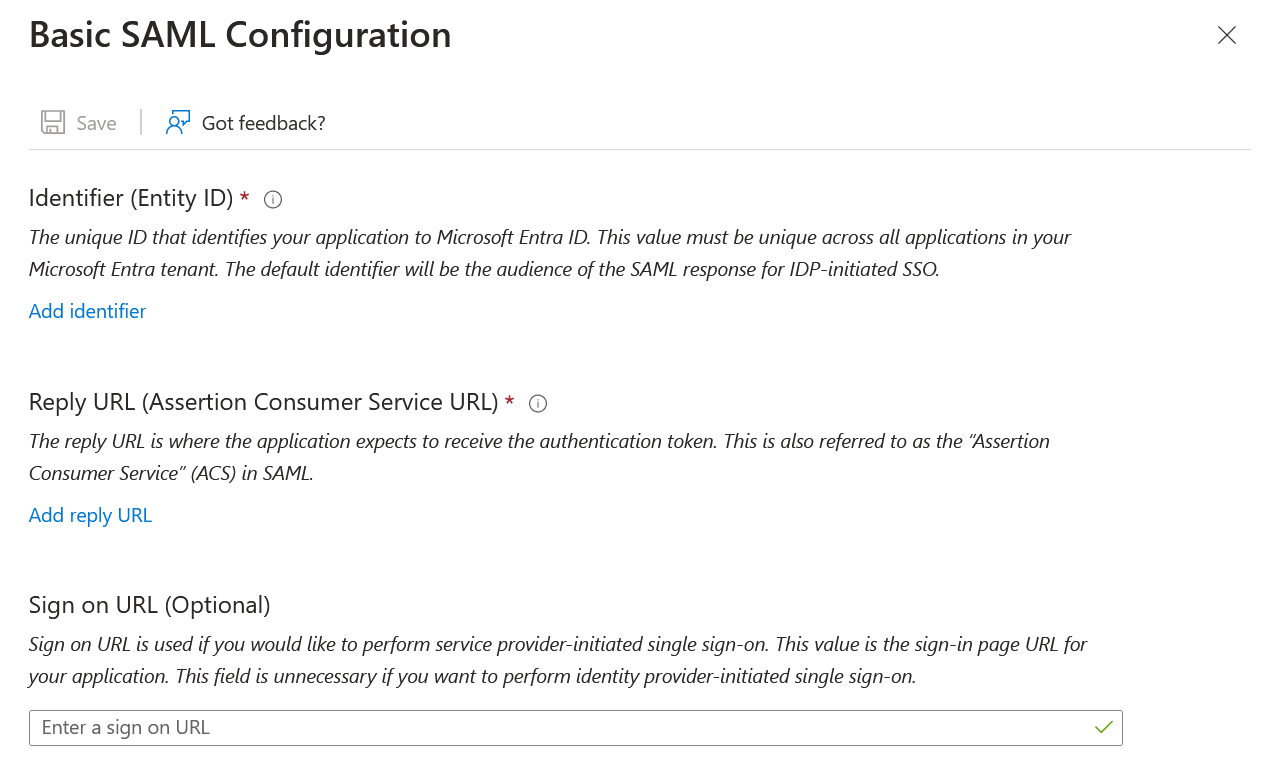
Basic SAML Configuration:
a. Enter an identifier. You can use any value.
b. Reply URL is https://lenovoclouddeploy.com/api/token/ws/exchange/LCD_Account_Key, replacing LCD_Account_Key with the 20-character key provided to you during onboarding.
For example, https://lenovoclouddeploy.com/api/token/ws/exchange/123456789ABCDEFGHIJK
c. Confirm the Default checkbox is checked.
User Attributes & Claims: Click Edit.
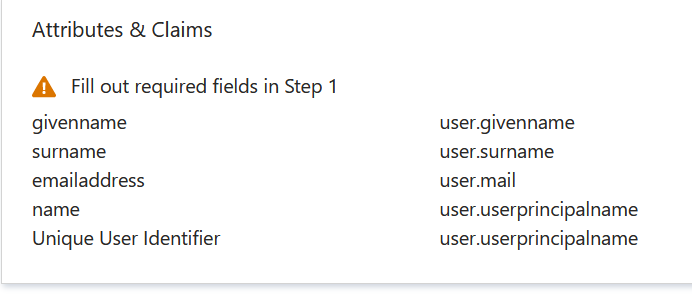
User Attributes & Claims: Add additional claims for name and email address.
Token Signing Certificate: Provide the App Federation Metadata URL to your LCD technical contact.
User Access URL:
a. In the application, under Manage, select Properties.
b. Provide the user access URL to your LCD technical contact.
8.3 - SAML setup for Windows Server
See the SAML overview before beginning these instructions. Your experience may differ slightly from the content below depending on your version of Windows Server.
In the AD FS Management Console, right click the Relying Party Trusts group and select Add Relying Party Trust….
Select Data Source: Select the option to enter data manually and click Next.
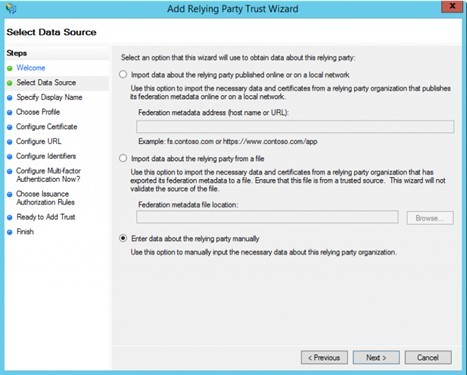
Specify Display Name: Enter the name you would like to use for the new trust entry and click Next.
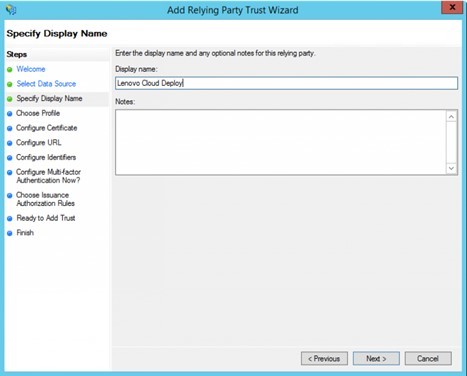
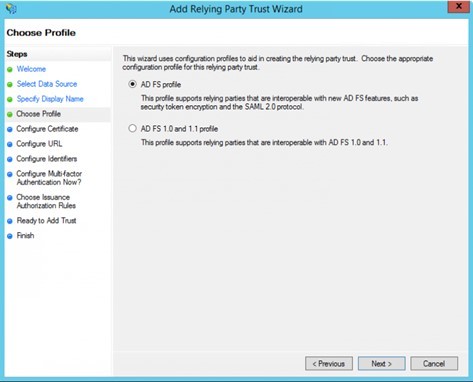
Choose Profile: Select AD FS profile and click Next.
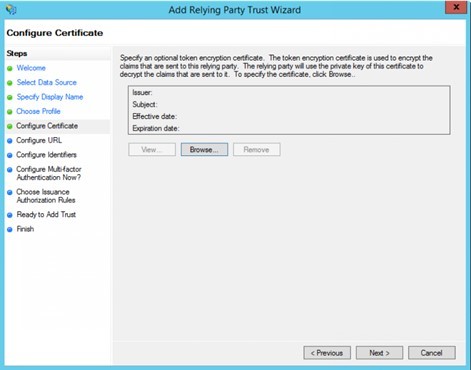
Configure Certificate: Lenovo Cloud Deploy does not support certificates. Click Next.
Configure URL:
a. Check Enable support for the SAML 2.0 WebSSO protocol.
b. Enter your service URL: https://lenovoclouddeploy.com/api/token/ws/exchange/LCD_Account_Key e.g. https://lenovoclouddeploy.com/api/token/ws/exchange/123456789ABCDEFGHIJK
c. Click Next.
Configure Identifiers:
a. Add https://lenovoclouddeploy.com as a Relying party trust identifier.
b. Click Next.
Configure Multi-factor Authentication: This step is optional. Click Next.
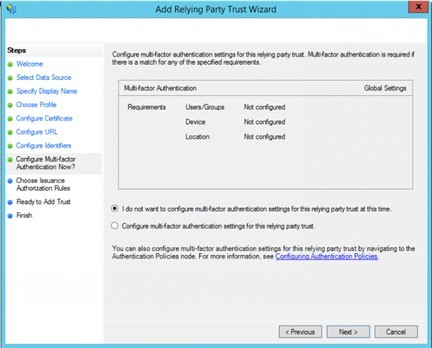
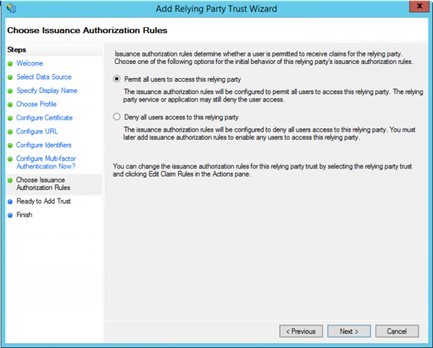
Choose Issuance Authorization Rules:
a. Select Permit all users to access this relying party.
b. Click Next.
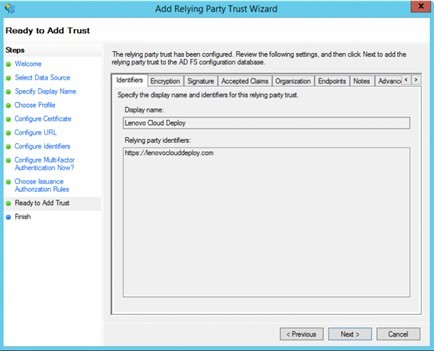
Ready to Add Trust: Review the summary and click Next.
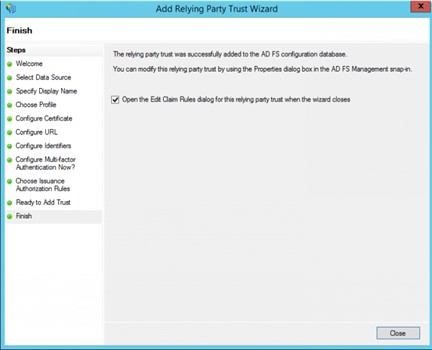
Finish:
a. Check the box to open the Edit Claim rules.
b. Click Close.
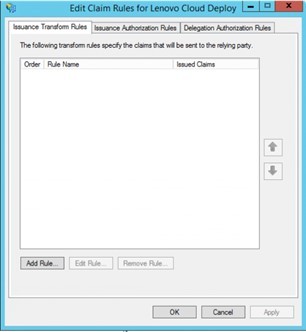
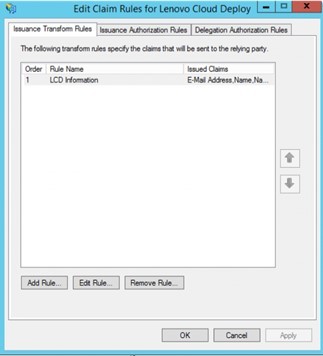
Issuance Transform Rules: Click Add Rule…
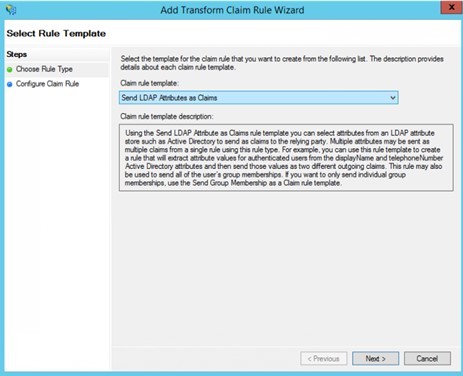
Choose Rule Type:
a. Select Send LDAP Attributes as Claims.
b. Click Next.
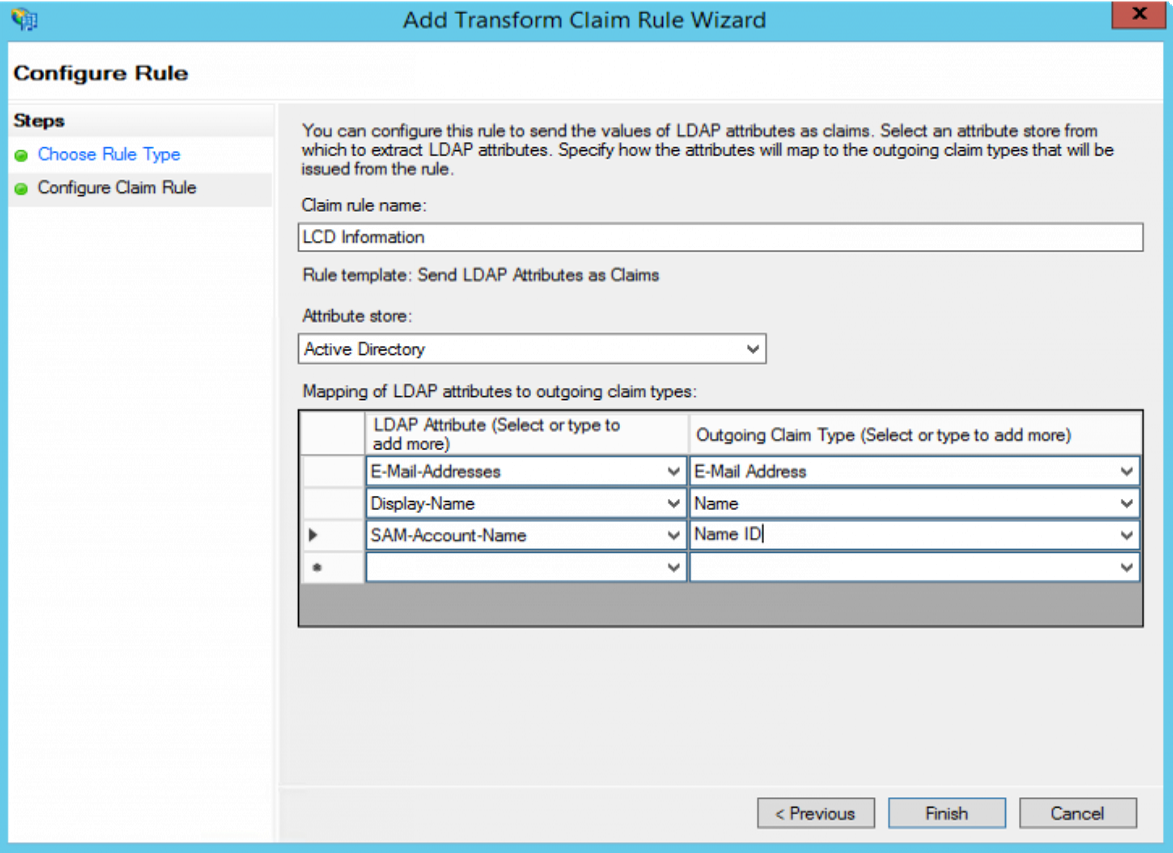
Configure Claim Rule:
a. Name the rule.
b. Select Active Directory.
c. Add the required mappings from section SAML setup for E-Mail Address, Name, and Name ID.
d. Click Finish.
Finish: Setup is now complete. Click OK.
8.4 - SAML setup for Okta
See the SAML overview before beginning these instructions.
This section provides an example setting up Okta as an identity provider for LCD. If you have questions, please contact Okta directly.
Create a New Application Integration:
a. Select Web platform.
b. Select SAML 2.0 as the Sign on method.
c. Click Create.
General Settings: Configure this to your preference and click Next.
a. Audience URI can be anything. It is the identifier for integration with LCD.
b. Single sign on URL is https://lenovoclouddeploy.com/api/token/ws/exchange/LCD_Account_Key. Replace LCD_Account_Key with the 20-character key provided to you during onboarding. This is the same account key you can use to sign into lenovoclouddeploy.com.
SAML Settings:
a. Name ID format is EmailAddress
b. Application username is Email
c. In the Name field, enter the user’s displayed name. You may use your preferred value.
d. In the Emailaddress field, enter the user’s email address.
SAML Settings: The metadata URL can be found here for integration with LCD. Click View Setup Instructions to proceed to the next step.
Select Method: The Identify Provider Single Sign-On URL is the Integration endpoint for integration with LCD.
8.5 - OpenID setup
Basic OpenID configuration
These are the data points that you will need to configure your OpenID setup.
Application ID or Client ID (Identifier)
The application-defined unique identifier assigned to LCD. For example, you can use LCD.
Client Authentication
LCD uses a client secret.
Grant Types
LCD uses the Authorization Code grant type.
Redirect URI
The following case-sensitive URL must be added to the allowed redirection URIs:
https://www.lenovoclouddeploy.com/auth/openIdLogin
Attributes & Claims
LCD requires the following three claims.
| Claim | Scope | Description |
|---|
| sub | openid | The user’s unique identifier. |
| name | profile | The user’s displayed full name. |
| email | email | The email address of the user. |
OpenID integration with LCD
Once everything is configured in your identity provider, the following three things are needed to
complete the LCD integration:
• Identifier (Entity ID)
• Client Secret
• Well-known/OpenID configuration
Identifer (Entity ID)
The application ID or client ID assigned to LCD.
Client Secret
The private key assigned to LCD.
Well-known/OpenID configuration
The OpenID Connect Metadata EndPoint. This is the provider’s Issuer (base) URL suffixed with
/.well-known/openid-configuration